Brother FAX 2750 ч.2: PDF инструкция по эксплуатации
Инструкция по эксплуатации Brother FAX 2750 ч.2. Ниже вы найдете PDF инструкцию на русском языке.
Не нашли ответ на свой вопрос? Напишите нам, и мы оперативно вам поможем.




39
S E T U P R E C E I V E
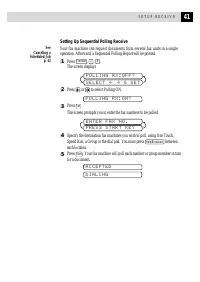
For FAX/TEL Mode Only
When the fax machine is in FAX/TEL mode, it will use the F/T Ring Time
(double ringing) to alert you to pick up a voice call. If you’re at the fax
machine, you can lift the handset to answer.
If you’re at an extension phone, you’ll need to lift the handset during the
F/T Ring Time and press
5
1
between the double rings. If no one is
on the line, or if someone wants to send you a fax, send the call back to the
fax machine by pressing
5
1
.
Changing Remote Codes
Remote Codes might not work with some telephone systems. The preset Fax
Receive Code is
5
1
. The preset Telephone Answer Code is
5
1
.
If you are always disconnected when accessing your external TAD remotely, try
changing the Fax Receive Code from
5
1
to
and the Telephone
Answer Code from
5
1
to
9
9
9
.
1
Press
Function
,
2
,
4
.
2
Press
or
to select ON (or OFF).
R E M O T E A C T . : O N ?
3
Press
Set
when the screen displays the setting you want.
F A X R E C E I V E :
*
5 1
4
If you want to, enter a new Fax Receive Code, then press
Set
.
T E L A N S W E R : # 5 1
5
If you want to, enter a new Telephone Answer Code, then press
Set
.
6
Press
Stop
to exit.
Printing a Fax in Memory
If you have Fax Storage ON for remote retrieval, you can still print a fax
from memory when you are at your fax machine.
1
Press
Function
,
8
,
4
.
2
Press
Start
.
3
After printing is finished, press
Stop
to exit.
See
Setting Fax
Storage
p. 73