LG 43LJ500V: PDF инструкция по эксплуатации
Инструкция по эксплуатации LG 43LJ500V. Ниже вы найдете PDF инструкцию на русском языке.
Не нашли ответ на свой вопрос? Напишите нам, и мы оперативно вам поможем.
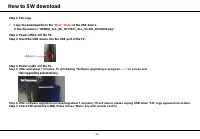
How to SW download
1/1
Step 1. File copy
Copy the download file to the
“Root” folder
of the USB device.
※
The file name is
“GEMINI_ALL_EU_NT72461_ALL_V3.280_20180202.pkg”
Step 2. Power off(AC off) the TV.
Step 3. Insert the USB device into the USB port of the TV.
Step 4. Power on(AC on) the TV.
Step 5. After wait about 1 minutes, TV will display “Software upgrading in progress……” on screen and
start upgrading automatically.
Step 6. After software upgraded successfully(about 1 minutes), TV will reboot, please unplug USB when “LG” logo appeared on screen.
Step 7. Check FW version(V 3.280). Press
3times “Mute” key with remote control.
USB port