TP-Link TL-SG105-M2 5x2.5GE: PDF инструкция по эксплуатации
Инструкция по эксплуатации TP-Link TL-SG105-M2 5x2.5GE. Ниже вы найдете PDF инструкцию на русском языке.
Не нашли ответ на свой вопрос? Напишите нам, и мы оперативно вам поможем.
Installation Guide
© 2021 TP
-Link
7106509199 RE
V1.0.1
5/8-Port 2.5G Multi-Gigabit Desktop Switch
Note:
For simplicity, we will take TL-SG105-M2 for example in this Guide.
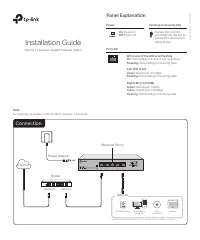
Panel Explanation
Connection
Router
LAN Port
WAN Port
Internet
Power Adapter
On:
Power on
Off:
Power off
Power
When one of the LED is on/flashing
On:
Connecting to a device but no activity
Flashing:
Transmitting or receiving data
Left LED (2.5G)
Green:
Running at 2.5 Gbps
Flashing:
Transmitting or receiving data
Port LED
Right LED (1G/100M)
Green:
Running at 1 Gpbs
Yellow
: Running at 100 Mbps
Flashing
: Transmitting or receiving data
Ethernet Ports
2.5G
1G/100M
Devices
2.5G
Wi-Fi 6 AP
2.5G NAS/Server
2.5G Gaming
Computer
Laptop*
*With a USB to 2.5G Ethernet adapter, you can enjoy the Ethernet up to 2.5 Gbps on your laptop.
Kensington Security Slot
Secure the lock (not
provided) into the slot to
prevent the device from
being stolen.