Dell Inspiron 14 (N4050) : PDF инструкция по эксплуатации
-User-Manual/webp/1.webp)
Инструкция по эксплуатации Dell Inspiron 14 (N4050). Ниже вы найдете PDF инструкцию на русском языке.
Не нашли ответ на свой вопрос? Напишите нам, и мы оперативно вам поможем.
-User-Manual/webp/2.webp)
Quick Start
Краткое руководство
| Brzi početak
Hızlı Başlangıç |
הריהמ הלחתה
Uniquely Dell
support.dell.com/manuals | www.dell.com
Printed in Poland
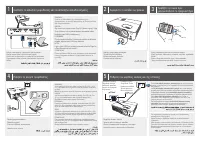
Connect the network cable (optional)
Подключите сетевой кабель (заказывается дополнительно)
| Priključite mrežni kabl (opcionalno)
Ağ kablosunu (isteğe bağlı) bağlayın |
(ילנויצפוא) תשרה לבכ תא רבח
Locate the service tag
Нахождение метки обслуживания
| Pronađite servisnu oznaku
Servis etiketini girin |
תורישה גת תא רתא
Información para NOM, o Norma
Oficial Mexicana
(sólo para México)
La información que se proporciona a continuación
aparecerá en el dispositivo que se describe en este
documento, en conformidad con los requisitos de la
Norma Oficial Mexicana (NOM):
Importador:
Dell México S.A. de C.V.
Paseo de la Reforma 2620 - Piso 11°
Col. Lomas Altas
11950 México, D.F.
Número de modelo reglamentario: P22G
Voltaje de entrada: 100 a 240 VCA
Corriente de entrada (máxima): 1,5 A/1,6 A/1,7 A
Frecuencia de entrada: 50 a 60 Hz
Corriente nominal de salida: 3,34 A/4,62 A
Voltaje nominal de salida: 19,5 VCC
Para obtener información detallada, lea la información
sobre seguridad que se envió con el equipo. Para
obtener información adicional sobre prácticas
recomendadas de seguridad, visite
dell.com/regulatory_compliance.
More Information
• To learn about the features and advanced options
available on your laptop, click
Start
→
All Programs
→
Dell Help Documentation
or go to
support.dell.com/manuals
.
• To contact Dell for sales, tech support, or customer
service issues, go to
dell.com/ContactDell
. Customers
in the United States, can call 800-WWW-DELL
(800-999-3355).
Information in this document is subject to change without notice.
© 2011 Dell Inc. All rights reserved.
Trademarks used in this text: Dell™, the DELL logo, and Inspiron™
are trademarks of Dell Inc.
2011–03
Regulatory model: P22G
Regulatory type: P22G001 and P22G002
Computer model: Dell Inspiron M4040/14-N4050
Turn on wireless (optional)
Включите беспроводную связь (необязательно)
| Uključite bežičnu vezu (opcionalno)
Kablosuz bağlantıyı (isteğe bağlı) etkinleştirin |
(ילנויצפוא) טוחלא תלעפה
Connect the power cable
Подключите кабель питания
| Priključite kabl za napajanje
Güç kablosunu bağlayın |
למשחה לבכ תא רבח
Press the power button
Нажмите кнопку питания
| Pritisnite dugme za napajanje
Güç düğmesine basın |
הלעפהה ןצחל לע ץחל